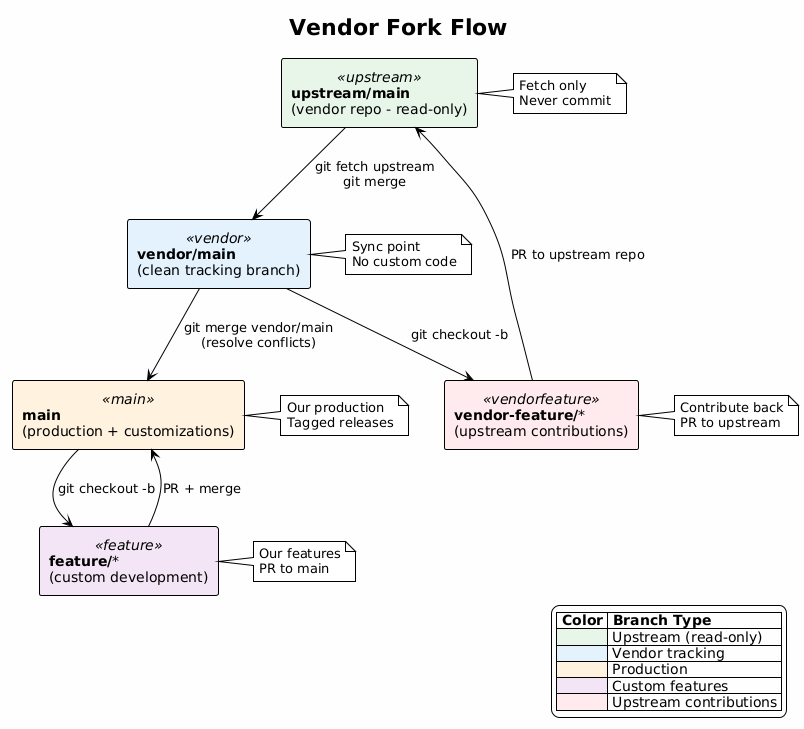
For projects maintaining a fork of external vendor code (OpenWebUI, Supabase, n8n, etc.).
This workflow enables tracking upstream changes while maintaining custom modifications. It separates vendor code from customizations for clean upgrades.
upstream/main (vendor's main branch - read-only mirror)
  ↓ (periodic sync)
vendor/main (our fork's tracking branch)
  ↓ (merge upstream)
main (our production with customizations)
  ↓ (branch)
feature/* (our custom features)
vendor-feature/* (contributions back upstream)
git fetch upstreamv1.0.0-custom.1vendor/main (upstream sync)feature/* (our features)mainfeature/custom-auth, feature/our-brandingmainvendor/mainvendor-feature/fix-bug-123main after accepted# Add upstream remote
git remote add upstream https://github.com/vendor/repo.git
git fetch upstream
# Create vendor tracking branch
git checkout -b vendor/main upstream/main
git push -u origin vendor/main
# Fetch latest from vendor
git fetch upstream

# Update vendor tracking branch
git checkout vendor/main
git merge upstream/main
git push origin vendor/main

# Merge to main with customizations
git checkout main
git merge vendor/main --no-ff -m "chore: sync upstream v2.5.0"

# Resolve any conflicts in custom areas
# Test thoroughly
git push origin main
# Create feature branch from main
git checkout -b feature/our-customization main

# Make changes
git add .
git commit -m "feat: add custom dashboard"

# Push and create PR to main
git push -u origin feature/our-customization
# Create PR on GitHub
# Branch from clean vendor code
git checkout -b vendor-feature/fix-bug-123 vendor/main

# Make fix (keep it minimal and focused)
git add .
git commit -m "fix: resolve issue #123"

# Push and create PR to UPSTREAM repo
git push -u origin vendor-feature/fix-bug-123
# Create PR on vendor's repository

# After upstream accepts, it will come back via normal sync
vendor/main to mainupgrade/v3.0 branch from mainvendor/main with new versionmain when stableCUSTOMIZATIONS.md| Stage | Trigger | Environment | Tests |
|---|---|---|---|
| PR Validation | On PR | CI (ephemeral) | Unit + Custom tests |
| Upstream Sync | Weekly schedule | CI | Upstream test suite |
| Integration | On merge to main | Staging | Custom + E2E |
| Production Deploy | On tag | Production | Full suite |
name: Vendor Fork CI

on:
  pull_request:
  push:
    branches: [main, vendor/main]
  schedule:
    - cron: '0 6 * * 1'  # Weekly Monday 6am

jobs:
  custom-tests:
    runs-on: ubuntu-latest
    steps:
      - uses: actions/checkout@v4
      - name: Install dependencies
        run: npm ci
      - name: Run unit tests
        run: npm run test:unit
      - name: Run custom tests
        run: npm run test:custom  # Our customization tests

  upstream-compatibility:
    if: github.ref == 'refs/heads/vendor/main' || github.event_name == 'schedule'
    runs-on: ubuntu-latest
    steps:
      - uses: actions/checkout@v4
      - name: Run upstream test suite
        run: npm run test:upstream  # Vendor's original test suite

  upstream-drift-check:
    if: github.event_name == 'schedule'
    runs-on: ubuntu-latest
    steps:
      - uses: actions/checkout@v4
        with:
          fetch-depth: 0
      - name: Check drift from upstream
        run: |
          git fetch upstream
          BEHIND=$(git rev-list --count main..upstream/main)
          echo "Commits behind upstream: $BEHIND"
          if [ $BEHIND -gt 100 ]; then
            gh issue create \
              --title "⚠️ Upstream drift alert" \
              --body "Main is $BEHIND commits behind upstream. Time to sync!"
          fi
        env:
          GH_TOKEN: $

  integration-tests:
    if: github.ref == 'refs/heads/main'
    needs: custom-tests
    runs-on: ubuntu-latest
    environment: staging
    steps:
      - uses: actions/checkout@v4
      - name: Deploy to staging
        run: npm run deploy:staging
      - name: Run E2E tests
        run: npm run test:e2e
| Test Suite | Purpose | When to Run |
|---|---|---|
| Upstream Tests | Ensure we haven’t broken vendor functionality | On vendor/main updates, weekly |
| Custom Tests | Validate our modifications | On every PR and push |
| Test Type | CI | Staging | Prod |
|---|---|---|---|
| Unit (custom) | ✅ | ❌ | ❌ |
| Unit (upstream) | ✅ | ❌ | ❌ |
| Integration | ⚠️ | ✅ | ❌ |
| E2E (custom flows) | ❌ | ✅ | ❌ |
| Smoke tests | ❌ | ✅ | ✅ |
src/
├── vendor/          # Untouched vendor code (or submodule)
├── custom/          # All our modifications
├── overrides/       # Files that override vendor behavior
└── config/          # Configuration differences
Maintain a CUSTOMIZATIONS.md:
# Customizations

## Modified Files
- `src/auth/login.js` - Added SSO support
- `src/ui/theme.css` - Custom branding

## Added Features
- Custom dashboard (`src/custom/dashboard/`)
- API extensions (`src/custom/api/`)

## Configuration Differences
- Database: PostgreSQL instead of SQLite
- Auth: SAML instead of basic auth
# Vendor version + our patch
git tag v2.5.0-custom.1
git tag v2.5.0-custom.2

# After major upstream sync
git tag v2.6.0-custom.1
Last Updated: 2026-01-28