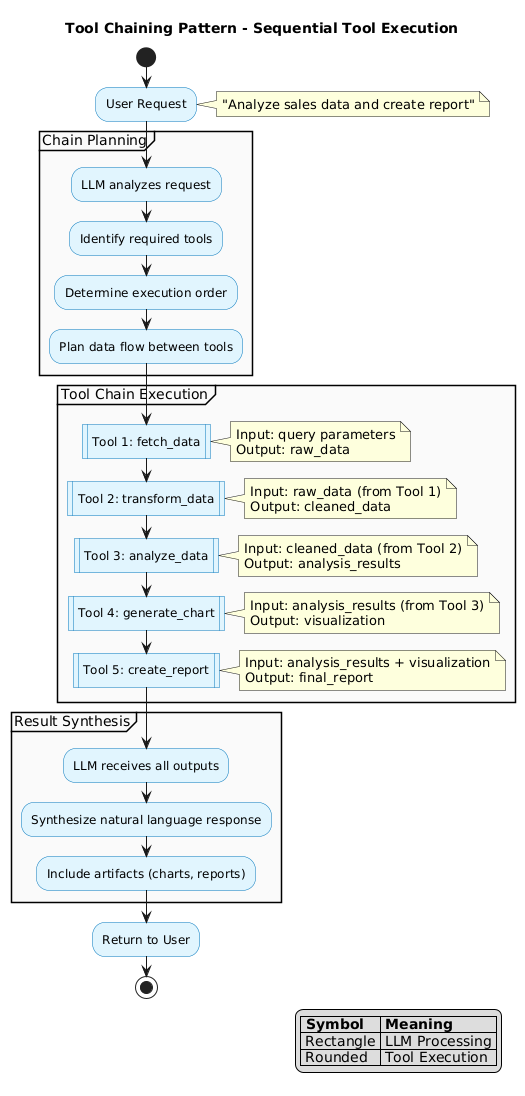
The Tool Chaining pattern enables LLMs to execute multiple tools in sequence, where each tool’s output becomes input for subsequent tools.
Tool chaining allows complex workflows by:
The LLM analyzes the request and determines:
Tools execute sequentially:
The LLM combines all outputs:
User Request: “Analyze our Q4 sales and create a presentation”
| Step | Tool | Input | Output |
|---|---|---|---|
| 1 | query_database |
SQL query | Raw sales data |
| 2 | transform_data |
Raw data | Cleaned dataset |
| 3 | calculate_metrics |
Cleaned data | KPIs, trends |
| 4 | generate_charts |
Metrics | Visualizations |
| 5 | create_slides |
Metrics + charts | Presentation |
Tool A → Tool B → Tool C → Result
        ┌→ Tool B ─┐
Tool A ─┤          ├→ Tool D
        └→ Tool C ─┘
Tool A ─┐
        ├→ Tool C → Result
Tool B ─┘
Tool A → [condition] → Tool B (if true)
                    → Tool C (if false)
{
  "chain_id": "sales_analysis",
  "steps": [
    {
      "id": "fetch",
      "tool": "query_database",
      "inputs": { "query": "SELECT * FROM sales WHERE quarter='Q4'" },
      "outputs": ["raw_data"]
    },
    {
      "id": "clean",
      "tool": "transform_data",
      "inputs": { "data": "${fetch.raw_data}" },
      "outputs": ["clean_data"]
    },
    {
      "id": "analyze",
      "tool": "calculate_metrics",
      "inputs": { "data": "${clean.clean_data}" },
      "outputs": ["metrics", "trends"]
    },
    {
      "id": "visualize",
      "tool": "generate_charts",
      "inputs": {
        "metrics": "${analyze.metrics}",
        "trends": "${analyze.trends}"
      },
      "outputs": ["charts"]
    }
  ]
}
| Error Type | Strategy |
|---|---|
| Tool failure | Retry with backoff |
| Invalid output | Replan chain |
| Timeout | Skip or use cached result |
| Dependency missing | Request from user |
| Benefit | Description |
|---|---|
| Composability | Combine simple tools for complex tasks |
| Reusability | Chains can be templated and reused |
| Debuggability | Inspect intermediate results |
| Flexibility | Modify chain steps as needed |
| Pattern | Relationship |
|---|---|
| LLM Tool Call | Single tool calls compose into chains |
| Skills Pattern | Skills may use tool chains internally |
| Agent Orchestration | Agents execute tool chains |